by imran
29. October 2011 14:52

In most CRM you can relate Contacts with other entities like Accounts or Opportunities. What if you wanted to relate a contact with another instance of contact? Why this is important?
These kinds of relationships can come handy in many business situations where you need to keep track of relationships. Suppose you are a real estate agent and you want to track a buyer (Contact), his agent(Contact), the broker(An Account) and the sale(an opportunity).
by SK Dutta
2. September 2011 07:57
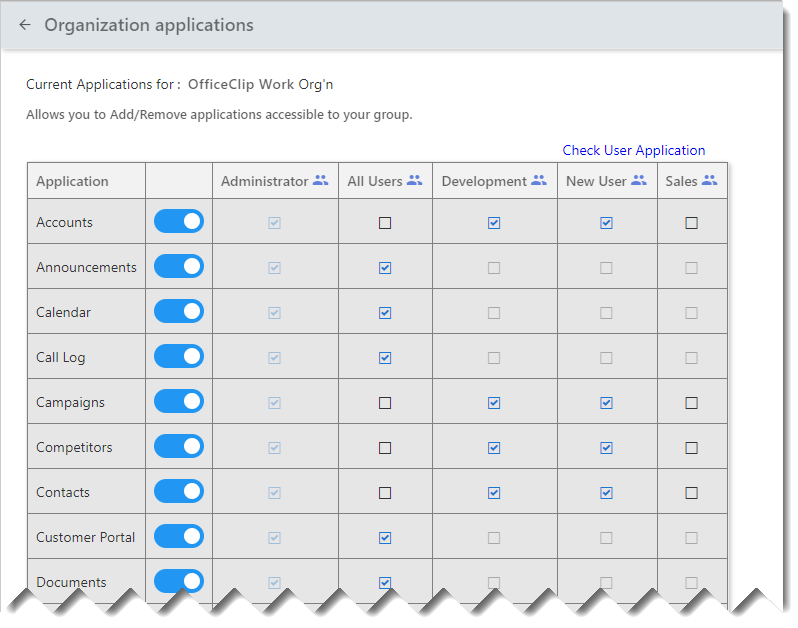
Yesterday one of our customers wanted to know how he can invite the employees of a new outsourcing company (he is working with) to OfficeClip but keep them from seeing internal information of the company.
Sometimes people have to go extra mile to hide their information. For example, if you want to give access to somebody to your personal computer, you may want to make sure that they do not have access to folders or files on the hard drive.
(Read More...)
by SK Dutta
11. May 2011 06:43

Do you need to notify your team members that the meeting which is going to start in 30 minutes is rescheduled?
When there is a need to notify people urgently, group SMS (or mobile text messages) is a useful tool. OfficeClip alerts supports quick text messages (SMS) in addition to emails. Sometimes, when people are on to go, mobile phones are useful for communicating various information like:
(Read More...)
by Vasantha Aditya
4. April 2011 17:40
Today a customer called and he wanted to link up contacts with opportunities. Although in the traditional sense opportunities are linked with accounts, in OfficeClip, there are a few ways you can create opportunities for contacts.
First let us see how the term opportunities is used in different contexts. Opportunities are usually tracked for customers in terms of their probablity of closure, who is closing them etc.
by SK Dutta
28. February 2011 18:56
Many users have asked about a simple way to create Avery labels using the OfficeClip. Web Contact Manager allows you to create labels in few easy steps. You will need to export the contact address from OfficeClip and then use the tool from the Avery website to create the label in Microsoft Word. The steps are given below:
- Export appropriate contacts from the OfficeClip Contact Manager as CSV file
- Download the Avery wizard for Microsoft Office from the Avery website
- Merge your contact data with the Avery Wizard
- Print the label, peel and put in envelope
(Read More...)
by Vasantha Aditya
15. February 2011 22:45

In the past we have received many questions about how to use the Campaign feature of OfficeClip and I thought that this blog, along with the video, will give a good idea. In short the campaign manager can do a few things:
- Send Html or text emails to some or all your contacts
- Ability to send campaigns made using Microsoft Word via the campaign manager (as html email)
- Use mailmerge to merge contact information with the print campaigns made with Microsoft Word.
(Read More...)
by SK Dutta
8. February 2011 02:00

OfficeClip Web Contact Manager allows administrators to manage duplicate entries. Duplicates can occur when data is entered or imported from various sources. The most likely reason for duplication is when data is imported without preprocessing and cleaning. OfficeClip presents all the duplicate sets to the user in an organized format allowing them to Skip, Merge and Delete duplicate entries.
This article explains various ways duplicates can be found in your contact files and how they can be resolved. Note that the users without administrative privileges will not have access to this feature.
(Read More...)
by Admin
2. February 2011 13:06

OfficeClip Contact Manager can now be used with Predictive Dialers. Steve Pavent CEO of Bluepayment.com has integrated such a dialer with his OfficeClip Contact Manager Suite.
"The beauty of this system is that you do not need to have any expensive equipments to set it up. All it needs is a broadband connection and a usb headset", says Steve Pavent. Integrating with the predictive dialer is saving at least 50% compared to the conventional dialer he was using with OfficeClip before. The workflow of this dialer is shown below:
(Read More...)
by Vasantha Aditya
17. January 2011 20:08
Some of our customers requested us to provide an enhancement to the OfficeClip Contact Manager so that they are able to create campaigns using the Microsoft Word® and be able to send them using the html email supported in OfficeClip.
One way is to do this is to create a Word campaign and then export it to html. This creates a few issues:
- The html created by the word document is not clean and can cause problems in many email clients
- The images are stored in a different folder and so they cannot be sent via email resulting all the graphics to be replaced by placeholders
- Most of the email clients switches off external files (for privacy reasons) unless it is from trusted source.
by SK Dutta
12. January 2011 17:23

With 2011 we have add two more ways for our users can communicate with us better. The first one is to capture your Ideas and Feedback in a better way and the second an OfficeClip Facebook Page to keep in touch with our customers who already has facebook account.
The new OfficeClip Feedback system allows users to:
- Enter ideas and feedback
- Vote on existing ideas and feedback
- Keep track of the status of feedback. OfficeClip developer would monitor this forum and post statuses on each feedback
Every month we are giving away a $50 amazon.com gift certificate to the most useful and popular feedback on the
feedback forum.
The
OfficeClip Facebook page will let you keep track of all the changes that are going on with OfficeClip products and services.
Photo courtesy hanspoldoja